Posts

The Duel Of Creatures (A trading card game in C++)
Image
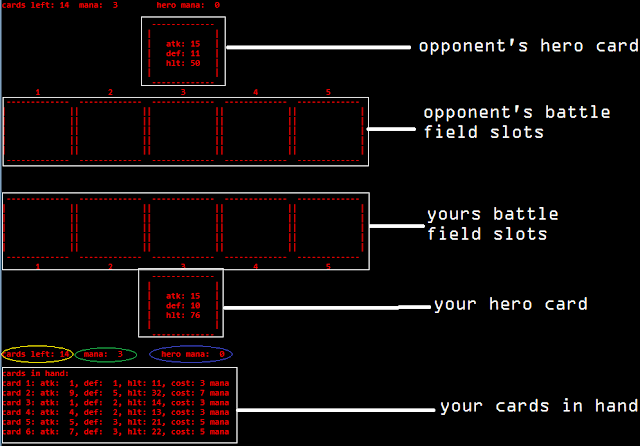
 A few days back I've been to my grandma's house for the Christmas vacation! Just when I was feeling quite bored with nothing to do, I stumbled upon the idea of creating a card game which is based on many famous card games like 'Yu-gi-oh', 'Duel masters' and 'Duels of order and chaos'. I had an idea of creating such a game for a long time, but I haven't taken the time to develop one. It might be due to the reason that my cousin brother who lives at my grandma's house because he plays these kinds of games. This might have triggered an interest in me to create the game and make him play.    Coming to the game it's a CUI(Character user interface) game and I've developed it using C++. This is a turn-based card strategy game. For people who don't know these kinds of games, here's a simple (and non-comprehensive) explanation. Each player has a deck which has a certain number(20 in my game) of cards. Each card represents a crea...

'Hello, World!' program in 7 different languages

Image
Generally 'Hello World!' program is the first ever program that you'd do in any language. It is a rite of passage into more complex programs in any language. So here's a quick look at how to write 'Hello, World!' program in 5 major languages which are: Java C C++ C# Python SQL Ruby   Java: public class HelloWorld { public static void main ( String [ ] args ) { // Prints "Hello, World" to the terminal window. System . out . println ( "Hello, World!" ) ; } } C: # include " stdio.h " int main ( void ) { printf ( " Hello, World! " ) ; return 0 ; } C++: # include " iostream " using namespace std ; int main ( ) { cout < < " Hello, World! " ; return 0 ; } C#: public class Hello { public static void Main ( ) { System . Console . WriteLine ( " Hello, World! " ) ; } } ...

HOW TO CREATE TEXT GAMES USING C! : PART 3 (Constructing a menu)

Image
This is the third part of the series of how to create text games using C. If you haven't seen the previous posts check them out by clicking the links below: PART 1 : Using the rand() function PART 2 : Getting started!   Coming to part 3, here we are going to discuss how to create a menu for the game. If we look at any game, having a menu screen is quintessential as it provides the user with various options. Generally big games have some of the following options in their menu screen: Play : Enters you into the game Options / Setting : Generally, helps you change the video, audio and other settings Leader Board : To show a record of top scores by players Help / Instructions : Gives instructions for playing the game About : Gives details of the game such as who created the game, copyrights etc. Exit : To exit the game For example, here's a screenshot of the game Assassin's creed: So now coming to our game which we are going to develop using C,...

Character arrays and Strings in C

Image
It is a general misconception that both character arrays and strings are one and the same. But, THEY ARE NOT THE SAME. If you already know the difference between them, then I hope this post will add a little more to what you already know. What are character arrays and strings? let's first see what they have in common. A character array and string are both sequence of characters i.e, they store the base address of multiple characters  in sequence and these characters can be accessed using index value. Here is what happens when you initialize a character array: //character array: char ch_arr [ 3 ] = " abc " ; /* DESCRIPTION: *here, *ch_arr[0] stores 'a' *ch_arr[1] stores 'b' *ch_arr[2] stores 'c' */ Here's what happens when you initialise a string: //string: char str [ ] = " abc " ; /* DESCRIPTION: *here, *str[0] stores 'a' *str[1] stores 'b' *str[2] stores 'c' * additiona...

Issues with using scanf() to scan characters in loops in C

Image
I've been a member of the question and answer site Stack Overflow for nearly a year now and there is one question that's always asked by beginners  in C language regarding scanning characters in a loop. Generally they would have a program like this: #include "stdlio.h" int main(void) { char again = 'y'; //declaration and initialisation of a `char` variable //declarations of other variables... //program.... //THE LOOP while (again == 'y') { //looping statement..... printf("want again? y/n : "); //THE PROBLEM scanf("%c", &again); //scanning the character } //rest of the program.... return 0; } and the question is why does the loop run only once even though they have entered input as `y` when prompted the message `want again?` while running the executable file. If you've ...

2048 using C++

Image
I still remember the first time I solved the 2048 along with my friend Prayank during a lunch break when I was in 12th grade... I went onto achieve some remarkable feats in the android app such as this:     Just the last day I started to think about the algorithm of 2048  and as a result of that train of thoughts this program resulted. I've made the game and also achieved 2048 in it (Yeah, yeah I could generate the tile but I'm saying the truth I played to get it) here's the video of the game, hope you enjoy it: here's the source code for the game : // 2048 game using C++ #include "stdafx.h" #include "stdlib.h" #include "conio.h" #include "time.h" void clear(void) { system("cls"); //clear the screen } int box_values[4][4] = { 0 }; //stores all the values at various positions ...

Hangman using C++

Image
Here's a video of  Hangman game that I've created using visual studio 2015 in C++ : I've  changed the source code a little from what you've seen in the video. Now this game even has a score board feature! have a look at it! other changes in the update include : At each word you get 6 lives instead of overall 9 lives which you've seen in the video. When you reset the game by pressing R (upper-case), instead of setting lives to zero and going to menu, the game would automatically restart (no going to menu as seen in video) Your score would be 10 multiplied by the number of word you uncovered successfully! here's the updated source code : // Hangman.cpp : to create a hangman game #include "stdafx.h" #include "string.h" #include "stdlib.h" #include "conio.h" #include "time.h" //----------------------------------------------------------------...